Case study
BECE Vault — a free notes library for PU Computer Engineering
A free, open-source notes library for Pokhara University BE Computer Engineering students — and the most complete thing I've built on my own.
The problem
When you study BE Computer Engineering at Pokhara University, the material you need for a subject rarely lives in one place. Lecture notes are passed around in group chats, past exam papers sit in someone's shared folder, lab reports exist as photos on a classmate's phone, and the syllabus is a PDF you download once and then can never find again. Every semester starts with the same scramble: asking seniors for last year's notes, hoping the links still work, and piecing together a set of material that should have existed already.
I'm a Computer Engineering student at NCIT myself, so I felt this every semester. Nothing here is hard to collect. It just isn't organised anywhere, and it isn't kept up to date. I wanted one place where any BECE student, at any PU college, could open a subject and find everything for it, for free, without signing up for anything.
What I built
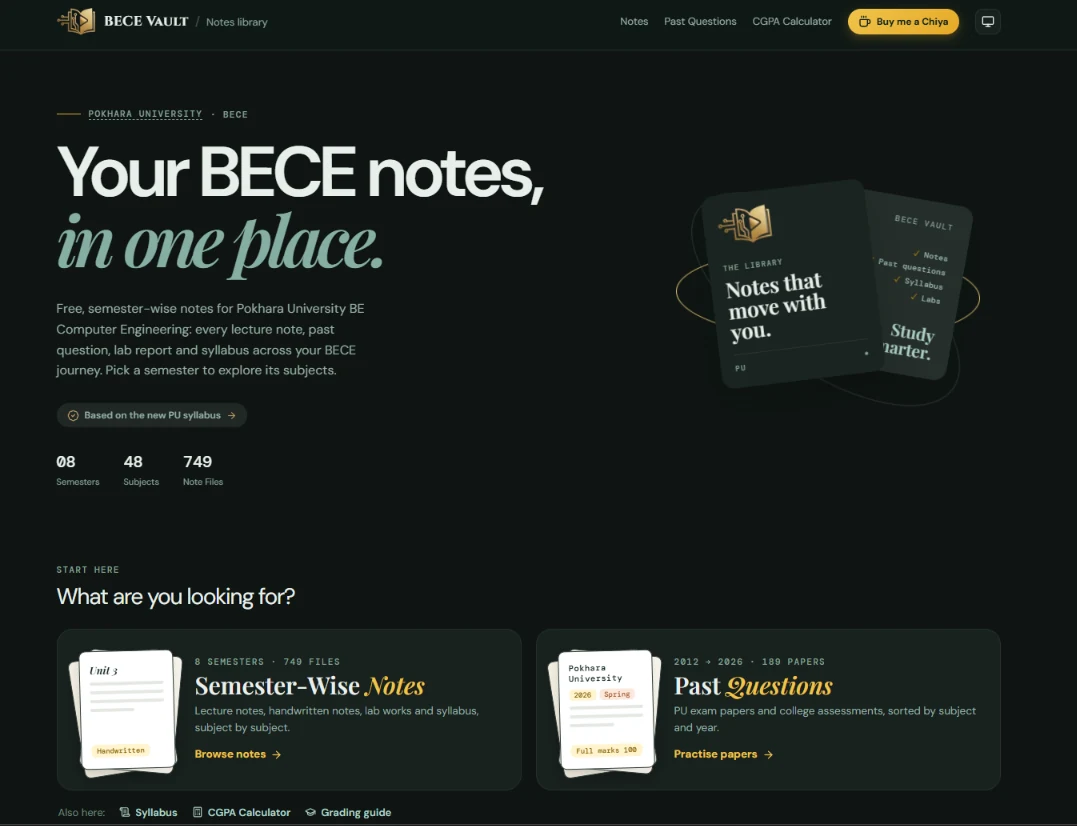
BECE Vault is that place. It's a free, open-source notes library for the whole programme, organised the way students actually look for material: first by semester, then by subject.
It covers all eight semesters with more than 800 note files: lecture notes, handwritten notes, question collections and lab work. It also has more than 200 past exam papers sorted by subject and year, and the full syllabus with a PDF download. Two tools came out of questions students kept asking. One is a CGPA calculator that uses Pokhara University's grading scale. The other is a plain-language guide to how PU grading works. Every subject also has a short study guide that says what to focus on, how to study it and what the exam tends to look like.
There's no login, no paywall and nothing to install. You open the site, pick a semester, pick a subject, and read.
How it works
The site is built with React and TypeScript on Vite, styled with Tailwind, and hosted on Vercel. The notes themselves live in a public GitHub repository, BECE_Notes, with one folder per semester and subject.
The catalogue builds itself from git. There's no hand-maintained list of files. A custom Vite plugin scans the note folders at build time and turns them into the catalogue the site renders, so adding a note is just a matter of committing the file. The plugin reads git log for each file's "last updated" date. In production it links each file straight from GitHub rather than copying several gigabytes of PDFs into the build.
Every page is real HTML. A single-page React app normally serves the same empty page for every URL and fills it in with JavaScript. That's fine for visitors and bad for search engines. A second plugin runs after the build and writes a real HTML page for every route, about 150 of them. Each page has its own title, description, canonical URL and readable content. The same step writes sitemap.xml and an llms.txt file for AI crawlers. Once the app starts, React takes over and visitors see exactly the same site.
A PDF viewer built for reading notes. Notes open in a custom viewer built on pdf.js instead of the browser's default one. It has search, zoom, highlighting and clickable links, and it renders pages lazily so a 200-page scan doesn't freeze a phone. It can also remember the last page you read in each file and reopen there. That only happens if you've accepted cookies; otherwise it lasts for the current visit only.
Watermarking on autopilot. This is the part I'm proudest of. The clean original files live in a private repository. A GitHub Actions workflow replays every commit from the private repository onto the public one, and on the way it stamps each new PDF and image with a small "Available on notes.arpanadhikari7.com.np" line and a light logo. Contributors send files through pull requests to the public repo. Another workflow watermarks the new files inside the pull request itself, so nothing reaches the main branch unstamped. The clean versions are kept privately.
Community. Contributors are credited on the site automatically, with how many files each person added counted from the git history. There's a feedback form, and a cookie-consent banner decides whether anything is stored on your device.
Challenges and solutions
Several gigabytes of notes don't fit in a build. Copying every PDF into the deployed site would have made every deploy slow and huge. Instead, the build only records which files exist, and the site loads each file from GitHub when someone opens it. Files stored with Git LFS get the right download URL automatically.
Watermarking without rewriting anyone's work. The obvious way to watermark is to change files in place. But I had hundreds of files already published, and I didn't want to lose the history of who added what and when. So I rewrote the public history to stamp the old files while keeping every commit, author and date intact. From then on, the private-to-public replay handles new files. Every replayed commit keeps its original author, date and message; only the committer is the bot.
Running untrusted pull requests safely. Watermarking a contributor's pull request needs repository secrets, and workflows that can see secrets must never run code from a stranger's pull request. The pull-request workflow only ever runs the scripts from the main branch. It reads the pull request's PDF and image files as data, stamps them, and pushes the stamped versions back to the pull request.
Repositories too big to check out. The full library is several gigabytes, which is slow to clone on every workflow run. The workflows use partial, sparse checkouts: only the scripts are on disk, and file contents are fetched one commit at a time as they're needed.
Being findable. A notes site nobody can find on Google doesn't help anyone. Prerendering every page, writing real descriptions, adding a sitemap and keeping URLs clean made the difference between "a React app" and "a site search engines can read".
Results
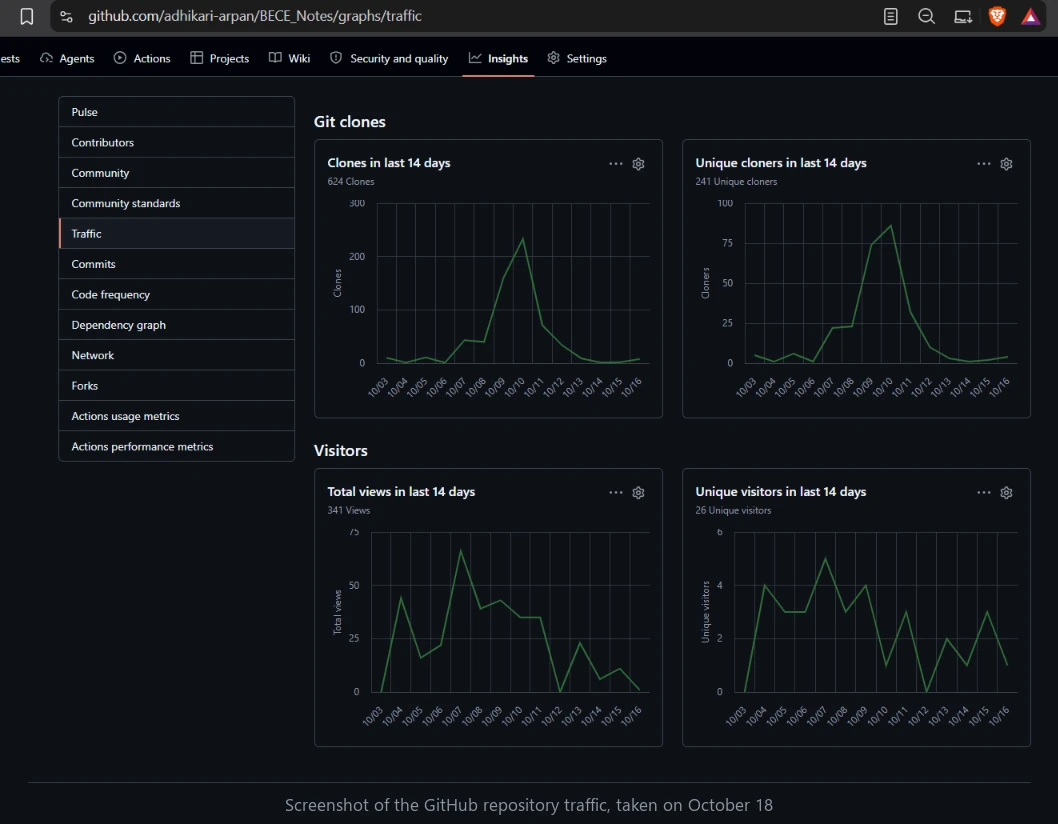
BECE Vault passed 2,000 page views by October 21, 2026. The GitHub repository behind it sees real use too. In the two weeks from October 3 to 16 it was cloned 624 times by 241 unique cloners. Between September 26 and October 9 its pages were viewed 709 times by 45 unique visitors.
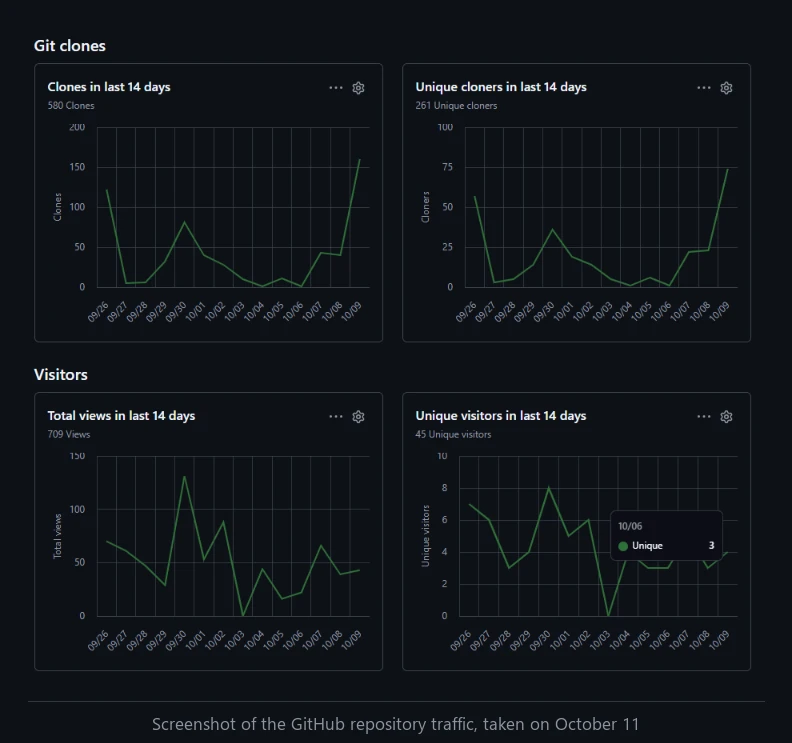
The numbers matter less to me than what they mean: students are actually finding the site and opening the notes, and the contribution pipeline is ready for the day they start sending their own files back.
What I learned
The biggest lesson was that the boring parts are the product. The interesting engineering — the viewer, the plugins, the pipeline — only matters because the notes are organised well and the site is quick to use on a phone with a bad connection.
I also learned to automate anything I'd otherwise do twice. Watermarking by hand would have been fine for ten files and impossible for eight hundred. Writing the workflows once took longer than stamping a batch myself, but it's why the project can keep growing without me doing more work.
I got much better at Git itself: replaying commits, rewriting history without losing authorship, and partial checkouts. And I learned that SEO for a single-page app isn't magic. It just means giving each URL real HTML.
Most of all, I learned that a project feels different when real people depend on it. A broken link isn't a bug in my code anymore. It's someone the night before an exam who can't open the notes they need.
Links
- Live site: notes.arpanadhikari7.com.np
- Source code and notes: github.com/adhikari-arpan/BECE_Notes
- Want to contribute notes? Open a pull request on the repository; new files are watermarked automatically.